
 My CPH Portal
  My CDI Portal
Recertify Your CDI
Below are instructions on how to update your contact information and report your CDI Recertification Credits.
Congratulations on becoming Certified in Disease Intervention (CDI)! You can begin reporting 30 credits that fall within your current 3-year period. Do not limit yourself to the helpful resources listed below. Qualifying activities for recertification credits include continuing education and professional development opportunities. Take the time to explore activities that interest you.
- Activities must relate to the CDI Content Outline and can be from any organization/provider. There are many options for finding recertification credits. These resources can help you in your search: TRAIN Learning Network, Public Health Learning Navigator, and Public Health Training Center Navigator.
- Review the CDI Recertification Activity Guide for a list of activities and number of hours for each.
- NOTE: Applying for recertification is not allowed at this time. You will receive information on submitting the recertification application once it is available.
Below are instructions on how to report your CDI recertification credits:
- Log into the CDI Portal. Note: You already have a CDI account, please do not create a new one. Email us at [email protected] if you are having issues login in. Once you have logged in, click on the “Circle Profile Icon” located on the top right-hand corner of your Dashboard and select “Account” to update your mailing address and/or email.
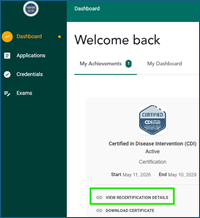
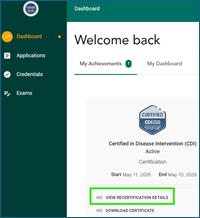
- Next, click on “Dashboard” to the left and select “View Recertification Details.”
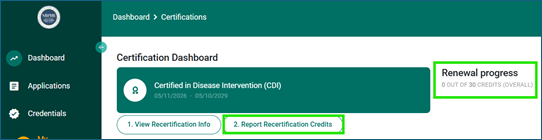
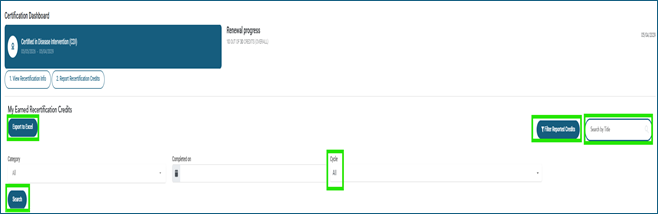
- You are now in your Certification Dashboard! The “Recertification Progress Bar” indicates the total number of credits required to recertify. As a reminder, you need to report 30 credits for every 3-year recertification cycle. Next, click on “Report Recertification Credits.”
- Enter the Start Date for the first activity and select “Recertification Activity” under category.

- Select the “Activity” from the dropdown. The system will provide guidance on the number of hours that can be reported per activity type. Enter the “Completion Date.”

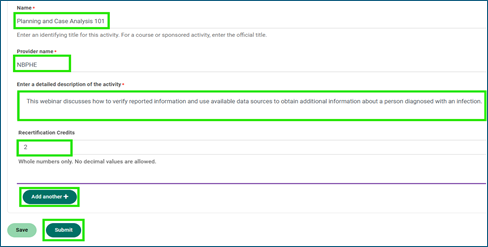
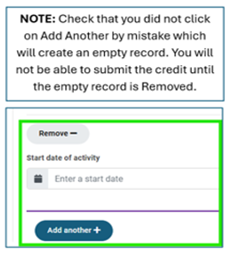
- Enter the “Name,” the “Provider Name,” provide detailed description of the activity, and input the number of credits. Click on “Add Another” to add additional activities to report in one application. Once done, select “Submit.”
- To view historical credits submitted, go back to “View Recertification Details.” Click on “Filter Reported Credits,” select “All” under Cycle, and click the blue “Search” icon. You are also able to view credits by 3-year cycles, “Search by Title” for a reported credit, and “Export to Excel”.
- Note: The “Used for Renewal” category will be listed as “No” until your recertification application is approved by NBPHE staff. Also, please ignore the “No topics currently applied” at the bottom of each credit entry.

If you have any questions or need assistance, please do not hesitate to contact NBPHE staff at [email protected].
Thank you for your continued commitment to disease intervention. We look forward to staying connected with you!
This project is supported by the Centers for Disease Control and Prevention (CDC) under Cooperative Agreement No. NU50CK000612 awarded to the Association of Schools and Programs of Public Health (ASPPH) and subawarded to the National Board of Public Health Examiners (NBPHE) under funding opportunity CDC‑RFA‑CK20‑2003. The contents are those of the author(s) and do not necessarily represent the official views of, nor an endorsement by, CDC/HHS or the U.S. Government.
